
You pay for clicks, not sales
Google and Meta charge you when someone clicks. After the click, their job is done.
The rest is up to your store. If the store doesn't convince the visitor, you paid for nothing.
Most owners fix ROAS inside the ad account: a new audience, a new bid, a new ad. That helps. But it changes only one part of the number.
And clicks get pricier every year. In 2025, Contentsquare saw visits cost 9% more, while 6% fewer visitors bought.
ROAS has three parts
ROAS = money from ads ÷ money spent on ads. It depends on three things:
- How many visitors buy. Your store decides.
- How much each buyer spends. Your store decides.
- How much one click costs. The ads decide. But your store changes it too.
Let's take them one by one.
1. More visitors buy
If 2 of 100 visitors buy, you pay for 50 visits to get one order. If 2.5 of 100 buy, you pay for 40.
Same ads. Cheaper orders.
Visitors leave when they can't quickly see what the product is, what it costs, whether it fits, when it arrives and where to tap. All of this should fit on one phone screen. On most stores it doesn't. More on that in where product-page doubt stops an order.
Speed counts too. In a Deloitte study, retail sites that got 0.1 seconds faster on phones turned 8.4% more visitors into buyers.
2. Each buyer spends more
- Good photos. Shoppers can't touch the product. If the $90 version looks like the $60 one, they buy the $60 one. Check the crop on phones.
- Options side by side. A 2-pack next to the single item, with the saving written out. See how a third option changes what people pick.
- Free shipping from a set amount. Show it next to the price. Set it a little above what people spend today.
In the same Deloitte study, shoppers on the faster sites spent 9.2% more.
3. Clicks get cheaper
This part surprises people. Your store changes the price of a click too.
Google counts your landing page as part of ad quality. Better quality often means a lower cost per click.
Meta prefers ads people are likely to buy from. If your store sells more, Meta rates your ads higher. They can beat ads with bigger bids.
Neither platform says by how much. Treat it as a bonus.
Ads learn from your sales
Meta needs about 50 sales a week to finish "learning." Until then, results jump around and each sale costs more.
A store that sells more per visit gets to 50 sooner, with the same budget.
Ad fixes wear out. Store fixes stay.
A new ad gets tired in a few weeks. A better product page works for every ad, every email and every visitor until you change it.
When the ads really are the problem
A good store can't save ads shown to the wrong people. If few people click, or the ad promises something the page doesn't show, fix the ad first.
Where to start
- Find the page your ads send people to most.
- Open it on your phone. Can you see the product, the price, one reason to trust it and the button?
- Check the speed. Remove apps and sliders you don't need. Fewer add-ons, faster store.
- Replace the weakest photo. Usually it's the first one.
- Next to the button, answer the doubts: size, delivery, returns. Write facts: "Free returns for 30 days."
- Give a reason to spend a bit more: a bundle, a bigger pack, a free-shipping threshold.
- Compare money earned per paid visit before and after.
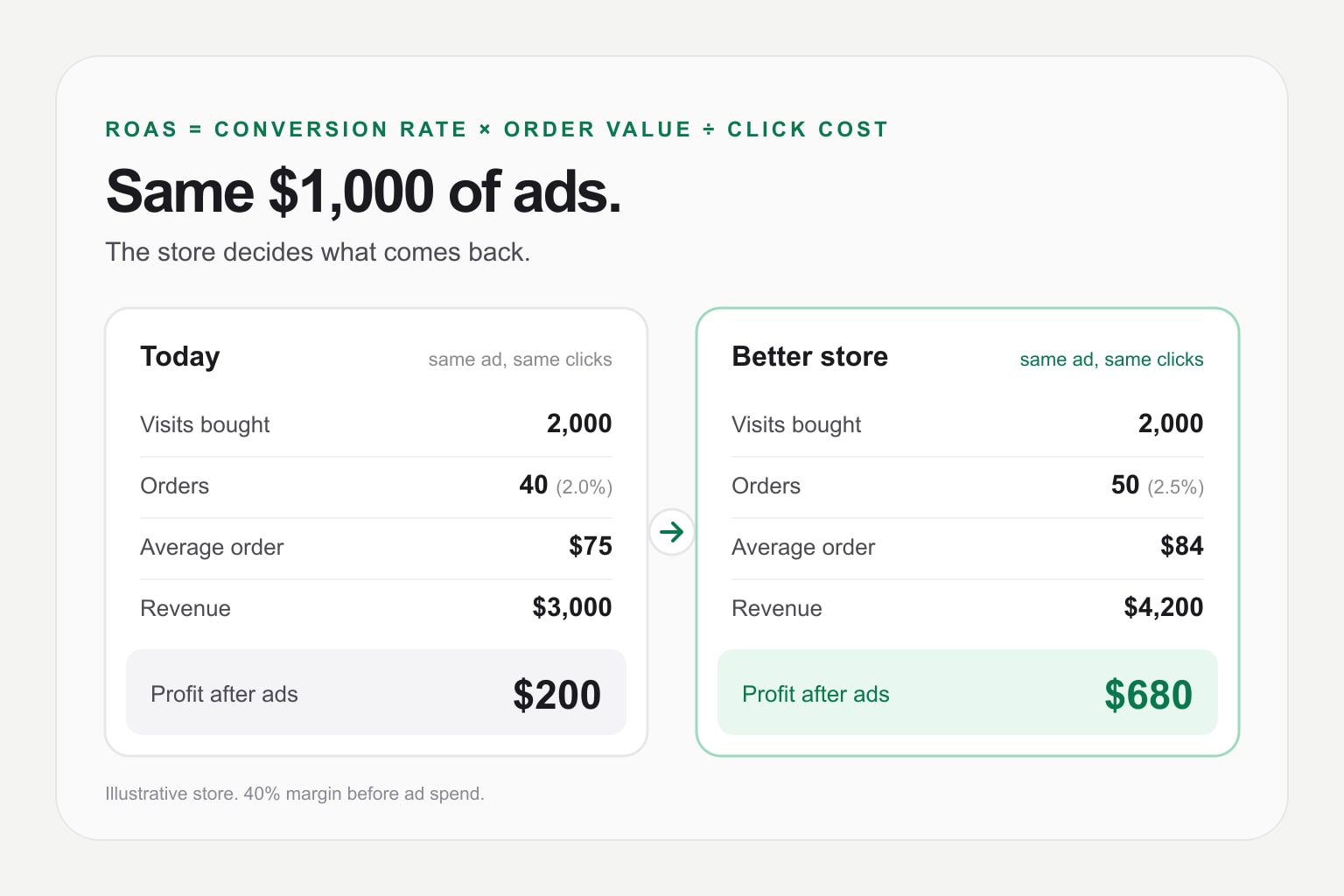
The math: same $1,000, three times the profit
Here is the example from the start. The store is made up. The math is real.
The store earns 40% on each sale before ad costs. So it needs $2.50 back for every $1 of ads just to break even.
| Today | Better store | + 10% cheaper clicks | |
|---|---|---|---|
| Ad spend | $1,000 | $1,000 | $1,000 |
| Cost per click | $0.50 | $0.50 | $0.45 |
| Visits | 2,000 | 2,000 | 2,222 |
| Visitors who buy | 2.0% | 2.5% | 2.5% |
| Orders | 40 | 50 | 56 |
| Average order | $75 | $84 | $84 |
| Revenue | $3,000 | $4,200 | $4,667 |
| ROAS | 3.0 | 4.2 | 4.7 |
| Profit after ads | $200 | $680 | $867 |
A quarter more buyers and 12% bigger orders don't add up. They multiply: revenue grows 40%.
Profit grows 3.4 times. Why? The ad bill stays the same, so almost every extra dollar becomes profit.
Cheaper clicks add more on top: $867.
Fix the store without risking the live one
Prettifai redesigns your Shopify store in a private draft. Seven AI agents work on the layout, photos, text, mobile view and speed, then check the result. Your live store stays untouched until you publish. See pricing.